
The phishing lures that work best in 2026 copy routine life admin: KYC and account checks, delivery and toll fees, tax and government notices, calls from “police”, job offers, e-signature requests, HR documents with QR codes and fake software fixes. The theme follows the news, but every lure still pushes you to act before you check.
We first wrote this post in 2019, after finding phishing emails in our own spam folder that used cyber security news and income tax deadlines as bait. Those genres still circulate. What has changed is how personal the bait is, how many channels carry it and how much of the work is automated. This update draws on the latest reports from APWG, Kaspersky, the FBI and Indian authorities.
The scale has grown with it. The Anti-Phishing Working Group counted 1,069,681 phishing attacks in the second quarter of 2026 in its Phishing Activity Trends Report, and Kaspersky blocked 554,002,207 attempts to follow phishing links in 2025, according to its spam and phishing report for 2025.
What the bait looked like in 2019
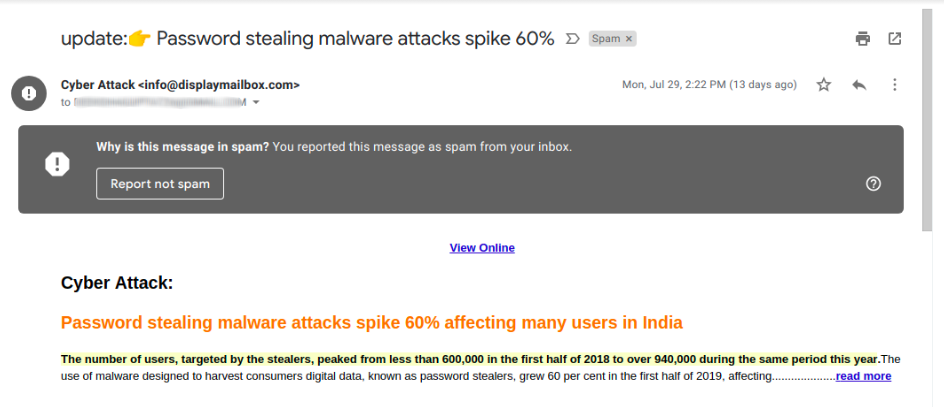
Back then, the typical subject lines were a failed delivery attempt, an urgent password reset, a suspended account or “suspicious activity detected”. One email we found posed as a news alert about password stealing malware. Its “read more” link delivered the malware itself.
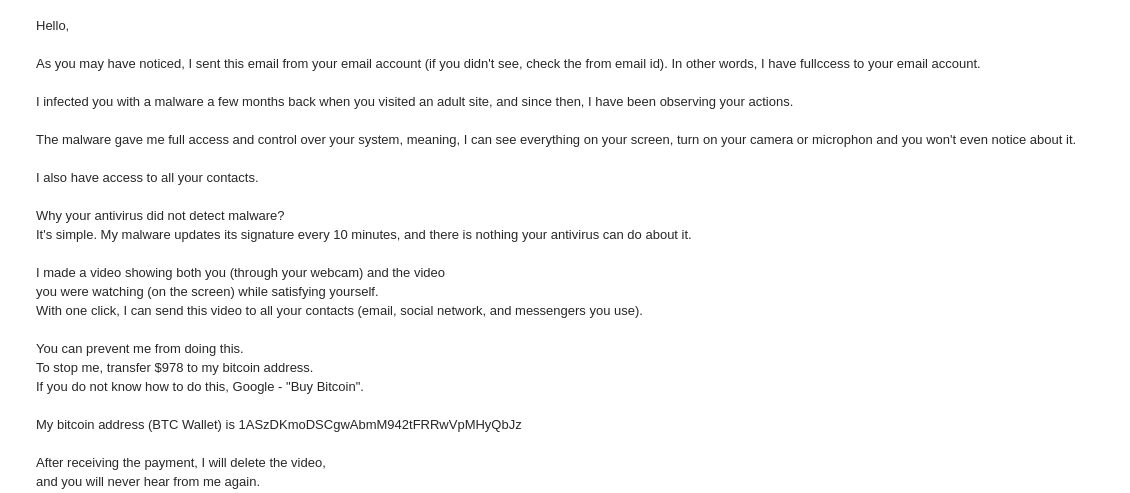
Another common genre was sextortion: a message claiming the sender had infected your computer, recorded you through the webcam and would share the video unless you paid in bitcoin. These emails are still sent in bulk today.
The lure themes of 2026
1. KYC and identity checks
The message says your bank, wallet or SIM KYC has expired and the account will be frozen unless you update it through a link. The Reserve Bank of India warned again in February 2024 that these frauds rely on false urgency and threats of blocking the account. Kaspersky saw KYC themed phishing surge in 2025, with fake pages asking for passport photos and pictures of the victim’s face from several angles.
2. Delivery, toll and small fees
A parcel is held, a toll is unpaid or a fine is due, and the fee is tiny. The small amount is the trick: the real target is the card details. The FBI’s IC3 received more than 2,000 complaints about toll payment smishing between early March 2024 and its public warning that April. Logistics and shipping brands made up 9.6% of phishing targets in APWG’s Q2 2026 data. We break down one SMS variant in the date-based domain trick.
3. Tax, government and “police”
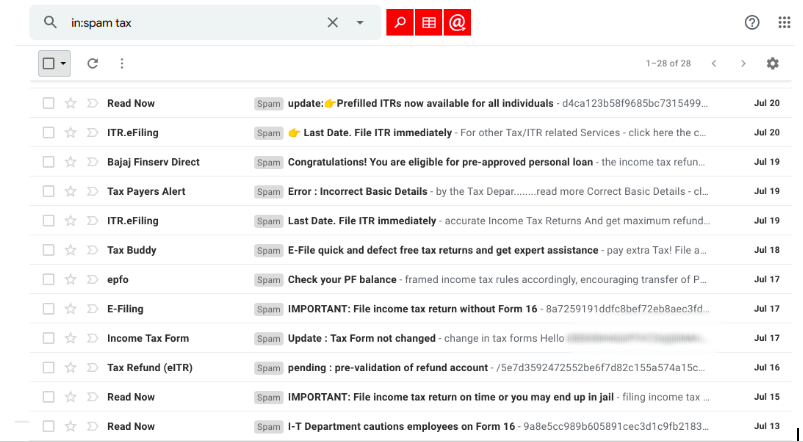
Tax season brings fake refund and filing notices, as our 2019 spam folder showed.
The darker version is impersonation of police, CBI or customs officers. In India this became the “digital arrest” scam, in which the victim is held on a video call and told to transfer money to clear their name. The Ministry of Home Affairs told the Lok Sabha that I4C had blocked more than 1,700 Skype IDs and 59,000 WhatsApp accounts used for digital arrests, in a reply published by PIB. In the US, government impersonation complaints to the FBI almost doubled, from 17,367 in 2024 to 32,424 in 2025, with reported losses of about $798 million, according to the 2025 Internet Crime Report.
4. Job offers and fake recruiters
APWG’s contributors report a rising number of email and social media job scams that impersonate recruiters and well known employers. Kaspersky describes “application forms” that ask for the phone number linked to your Telegram account and then for the login code, which hands over the account. Others charge a small fee for “document processing”. IC3 employment fraud complaints rose to 24,688 in 2025.
5. Votes, contests and messaging app codes
A WhatsApp message asks you to vote for a child in a photo contest. The voting page asks for your number and then the six-digit code WhatsApp sends you. Enter it and your account is gone too. Kaspersky found children’s contests were the most common version of this scheme in 2025.
6. E-signature, HR policies and QR codes
A document is “waiting for your signature”, or HR has shared a new policy you must read. In 2025 Kaspersky saw these lures move the QR code into a PDF attachment, and even into calendar invites, to get past email filters. Scanning it opens a fake Microsoft sign-in page on your phone, away from your work laptop’s protections. More on this in what QRishing is.
7. “Fix it yourself” instructions
Instead of attaching malware, the message or web page tells you to fix a “critical update” or prove you’re human by opening a command window and pasting a line of text. Kaspersky reports these instruction based infections continued through 2025. No genuine site or support team asks you to paste commands into Run or PowerShell.
8. AI as the topic and as the tool
Fake ChatGPT Plus payment pages and paid “prompt kits” use AI as the bait. AI also writes cleaner lures and clones voices. The FBI received 22,364 complaints mentioning AI in 2025, with adjusted losses of more than $893 million, including more than $5 million lost to “distress” scams, the family emergency calls in which a cloned voice can play the relative.
9. Fake email threads and two-step BEC
Business email lures now come with history. Kaspersky saw BEC emails carrying a fabricated forwarded conversation with a colleague to make a payment request look approved. Fortra, writing in the APWG report, saw more “two-step” attacks, where the first email is a harmless inquiry and the phishing link only arrives once you reply.
How to handle any lure: what to do
- Treat urgency as the warning sign, whatever the story.
- Go to the source yourself: the official app, a typed address or the number on your card. Never use contact details from the message.
- Never share an OTP, PIN, password or a WhatsApp or Telegram login code.
- Don’t scan QR codes in unexpected documents, and never paste commands a website gives you.
- Agree a code word with family for emergency calls.
- In India, report fraud on the 1930 helpline or at cybercrime.gov.in as soon as money moves.
For organisations, train staff on these current lures rather than 2019 examples, confirm every payment change by phone, and watch for fake pages and accounts that use your brand. TIKAJ’s anti-phishing services find and remove them.
FAQ
What is a phishing lure?
A phishing lure is the story or hook a scammer uses to get you to click, reply, call or pay. It can be a delivery problem, an expiring KYC, a tax refund, a job offer or a threat from “police”. The lure changes with the news and the season, but it nearly always creates urgency and asks for data, a code or money.
Why do phishing lures keep changing?
Lures change because people and email filters learn to spot old ones. Attackers follow the calendar, such as tax deadlines and sales, and the news, such as new AI tools or government schemes. They also copy whatever works: when a theme brings in money, it spreads quickly to new countries, languages and channels like SMS and WhatsApp.